
muwav is a music player built for people who own their music — and want it to feel like theirs again.
No subscriptions. No algorithms deciding what you hear next. Just your library, organized around the way you actually live.
How do you say it?
Rhymes with “mauve.” Starts like “moi.” One syllable, one glide — /mwɑːv/ .
You don’t pronounce it. You ride it.
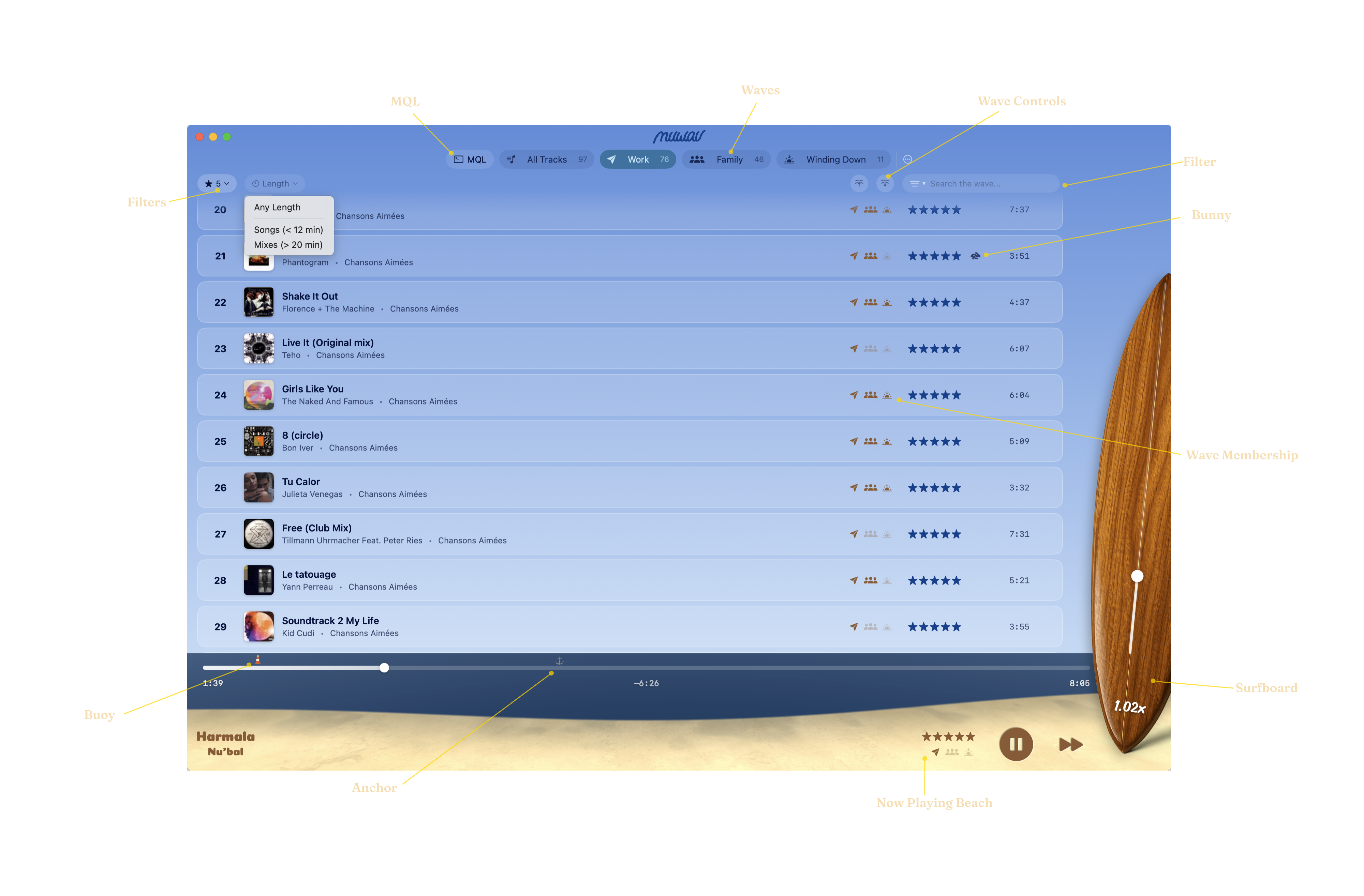
- Waves
- your music doesn’t live in one big pile — it lives where you live. a Wave is a context: Work, Family, Winding Down. a track can belong to as many Waves as it fits, and when you switch Waves, muwav switches with you. no playlist maintenance, no “shuffle all” roulette.
- Wave Controls
- as tracks play, they sink to the bottom of your Wave, so the top is always what’s fresh. dive takes you straight down to what you’ve already heard; resurface brings you back up to what’s next. it’s how you revisit without losing your place.
- Wave Membership
- every track shows you, at a glance, which Waves it belongs to. no digging through playlist menus to remember where you filed something — it’s right there on the row.
- MQL
- the muwav Query Language searches your entire library, no matter which Wave you’re riding. when you know exactly what you want — or exactly the kind of thing you want — MQL gets you there in one line instead of ten clicks.
- Filter
- type a few characters and your current Wave narrows to just the tracks that match. it’s the fast way to find that one song you know is in here somewhere without leaving the Wave you’re in.
- Filters
- narrow your Wave by rating or by length. want only your five-star tracks while you work? just the long mixes for a road trip? two clicks. you told muwav what you love — Filters is where that pays off.
- Surfboard
- your standard playback controls, plus one thing the standard players don’t have for surfing your soundwaves: a speed slider. nudge a track a little faster or slower until it sits right.
- Bunny
- the bunny means this track has a speed adjustment. set it once and muwav remembers — every time this track comes around, it plays at your speed, not the recording’s.
- Now Playing Beach
- full transport controls with scrubbing, always at the bottom of your screen. what’s playing, where you are in it, and everything you need to steer — without leaving your Wave.
- Buoy
- drop a buoy to set a custom start or end point on a track. long intro you’re tired of? outro that overstays its welcome? muwav will start and end the track exactly where you want, every single time, and the original file is never touched.
- Anchor
- muwav can mark tracks as played right at the beginning, at the end, or anywhere in the middle — you drop the anchor where you think a listen counts. when a track crosses its anchor, it keeps playing to the finish, but it sinks to the bottom of the Wave so something fresh comes up next.